Logseq-Git-Sync-101





 ## Description
This repo aims to help Logseq users to sync their data via Git and GitHub.
## Description
This repo aims to help Logseq users to sync their data via Git and GitHub.

## Why use Git + GitHub to sync Logseq graph?
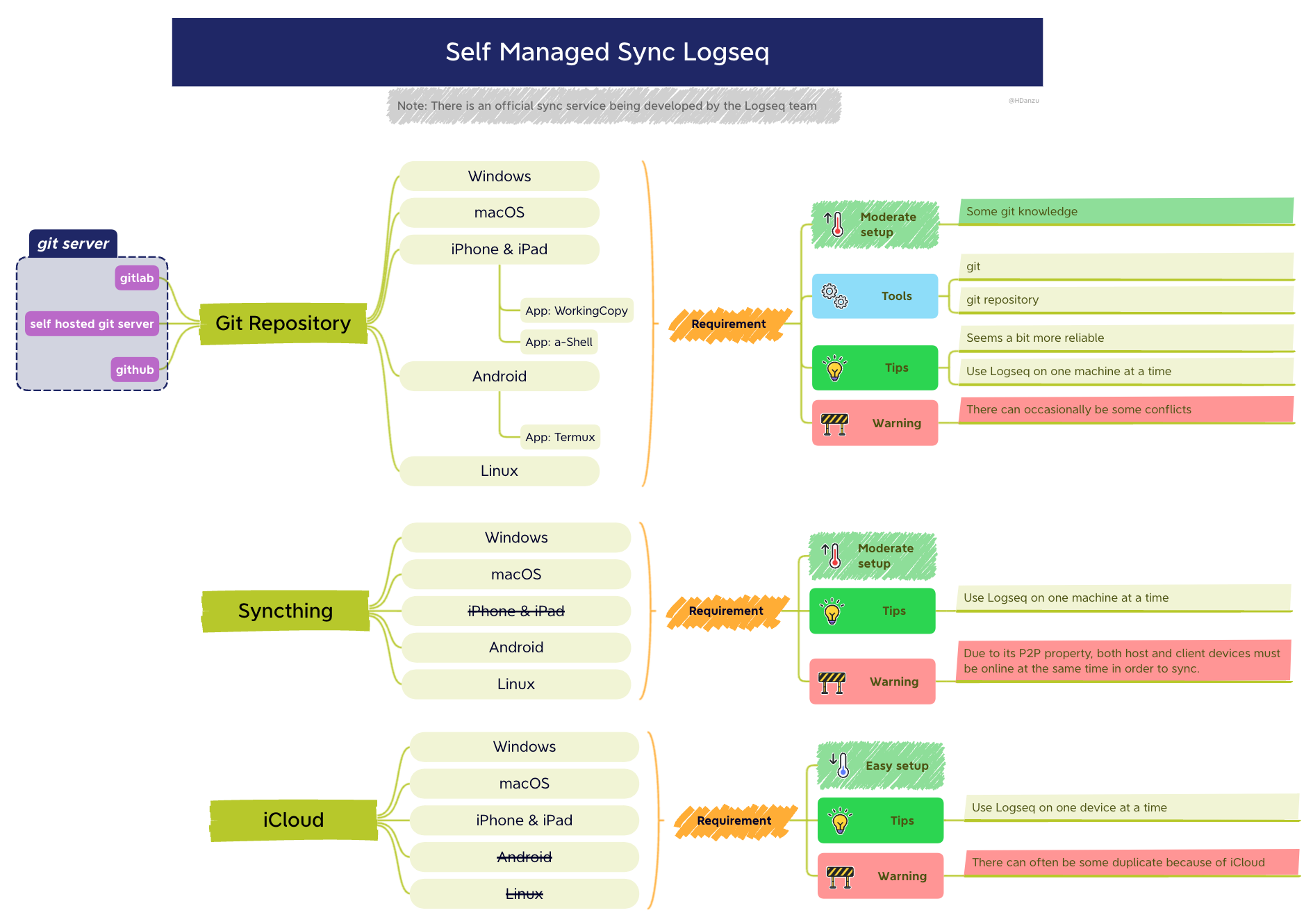
Self Managed Sync Diagram, by @danzu
From the above diagram, it's pretty obvious that **Git** is the most robust way to sync your graph. iCloud is slow and problematic, and [Syncthing](https://syncthing.net/downloads/) is not available on iOS/iPadOS.
However, Git is quite scary for non-programmers, so this doc is here to help!
---
## 🎩 Suit up
Please check [Prerequisite](https://github.com/CharlesChiuGit/Logseq-Git-Sync-101/wiki/Prerequisite) and get yourself a cup of coffee ☕.
## 🤔 So how does this method work?
Please check [Workflow](https://github.com/CharlesChiuGit/Logseq-Git-Sync-101/wiki/%F0%9F%AA%9C-Workflow).
## Now you need another cup of coffee
###  For Windows users
Please check [Windows](https://github.com/CharlesChiuGit/Logseq-Git-Sync-101/wiki/For-Windows-users).
###
For Windows users
Please check [Windows](https://github.com/CharlesChiuGit/Logseq-Git-Sync-101/wiki/For-Windows-users).
###  For macOS users
Please check [macOS](https://github.com/CharlesChiuGit/Logseq-Git-Sync-101/wiki/For-macOS-users).
### For iOS/iPadOS users
Please check [iOS/iPadOS](https://github.com/CharlesChiuGit/Logseq-Git-Sync-101/wiki/For-iOS-iPadOS-users).
###
For macOS users
Please check [macOS](https://github.com/CharlesChiuGit/Logseq-Git-Sync-101/wiki/For-macOS-users).
### For iOS/iPadOS users
Please check [iOS/iPadOS](https://github.com/CharlesChiuGit/Logseq-Git-Sync-101/wiki/For-iOS-iPadOS-users).
###  For Android users
Please check [Android](https://github.com/CharlesChiuGit/Logseq-Git-Sync-101/wiki/For-Android-users).
###
For Android users
Please check [Android](https://github.com/CharlesChiuGit/Logseq-Git-Sync-101/wiki/For-Android-users).
###  For Linux users
Linux users click here
If you are a Linux user, why are you still watching this repo? Shooo. 😎
Lol, just a joke. Take the steps in macOS section as reference if you need it.
## 💥 Omg, Something blows up
Please check [FAQ](https://github.com/CharlesChiuGit/Logseq-Git-Sync-101/wiki/%F0%9F%92%A5-FAQ).
---
## Change log
2022-11-01: Update `Prerequisite`, `For macOS users`, `For Android users`, `FAQ` wiki.
---
## 🪨 References
- [Working Copy on iOS](https://discord.com/channels/725182569297215569/766475028978991104/946787658405908560), by @danieltomasz[^1].
- [Steps to auto sync iOS + Windows](https://discord.com/channels/725182569297215569/924907384730689566/966343847934324776), by @Caps[^3].
- [Gitea - self-hosted git server](https://discord.com/channels/725182569297215569/924907384730689566/963840487712780320), by @Sawhney[^2].
- [Self Managed Sync + Android setup](https://discord.com/channels/725182569297215569/966983361249816586), by @danzu[^5] and @Abulafia[^4].
- [Git hooks settings](https://discord.com/channels/725182569297215569/960982172683100160)
- [What is GitHub?](https://kinsta.com/knowledgebase/what-is-github/)
- [How does Git work?](https://medium.com/@sahoosunilkumar/how-does-git-works-5cc8444ea383)
- [Repository size limits for GitHub.com](https://stackoverflow.com/questions/38768454/repository-size-limits-for-github-com)
- [About large files on GitHub](https://docs.github.com/en/repositories/working-with-files/managing-large-files/about-large-files-on-github)
- [Differences between CRLF and LF](https://violin-tao.blogspot.com/2016/05/crlflf-bug.html), in Chinese.
## 🎉 Acknowledgment
Credits to @danieltomasz[^1], @Sawhney[^2], @Caps[^3], @Abulafia[^4] @qwxlea[^5] for the workflow build up. And credits to @danzu[^6] for the incredible diagram!
FYI, those IDs are IDs in [Logseq Discord Server](https://discord.gg/bZ2jF9taUg).
[^1]: danieltomasz#5748
[^2]: Sawhney#7320
[^3]: Caps#0219
[^4]: Abulafia#3734
[^5]: qwxlea#3490
[^6]: danzu#6567